
You own your website, domain and online store only if they are in your company’s name. Not if you paid for them, and not if you have the passwords. Every platform obeys whoever holds the top role on the account: the registrant of the domain, the owner of the store, the super admin of the email. If your agency or developer set those accounts up in their own name, they hold the keys. You are the tenant.
Most of what you’ll read about this stops at the website and the domain. But a business runs on at least seven accounts, from the business email to the GST registration, and the same rule applies to every one of them. It’s the idea behind how I work: your technology needs an owner, not another tool.
In my experience it is common, and usually not out of bad intent. An agency sets everything up in its own account because it is quicker, the site goes live, everyone is happy, and nobody moves anything across. It only matters on the day something goes wrong: the agency relationship ends, a developer stops answering, a renewal is missed, or a stranger gets into the one Gmail that runs everything.
Who owns a Shopify store your agency built?
Your agency does, until it transfers ownership to you. If you sell online, three things would stop your business if you lost them: the store, the customer list and the web address.
- The store itself. A Shopify store can have only one owner. Agencies normally build the store and then transfer ownership to the client when it goes live; until that transfer happens, the store is the agency’s.
- Your customer list. The store owner has complete access to the admin and decides what everyone else can see and do, including who can export your customers.
- Your web address. It is printed on every parcel. Whoever holds the domain decides where it points, and a renewal that lapses can take your store offline.
Having the store and domain passwords doesn’t make you the owner. A password lets you in; the top role decides who can let others in, move the account, or lock you out. Asking takes an afternoon: ask for the store transfer, and for the domain and the admin access to be put in your company’s name. The agency still builds. You keep the keys.
Which accounts should be in your company’s name?
Seven accounts should be in your company’s name: the domain, the business email, the Facebook and Instagram business portfolio, the WhatsApp number, the Google listing, the GST registration and the website hosting. On each, your business holds the top role and two of your own people can get in; agencies, developers and your CA get their own, lower access.
Here is who should hold each one and where to check. Six apply anywhere; GST is India-only, and the Sanchar Saathi check is for Indian mobile numbers. The paths come from each platform’s own help pages, linked below and read in November 2026. Labels change, so look for the same setting if yours looks different.
| Account | Who should hold it | Where to check |
|---|---|---|
| 1. Domain | Registered in your company’s name, with the registrar login in your own hands | Registrar account > your domain > contact details (GoDaddy: Domain Settings > Contact Info) |
| 2. Business email | Two of your own people as super admins; your IT vendor gets a lower role | Google Workspace: Admin console > Account > Admin roles > Super Admin > Admins |
| 3. Facebook and Instagram | Your business created the business portfolio and has full access; the agency is added as a partner | Meta Business Suite > Settings > People > [person] > Business portfolio access |
| 4. WhatsApp number | A number in the company’s name, not a personal or employee phone | India: Sanchar Saathi > Know Mobile Connections In Your Name. Elsewhere: the account holder on the mobile contract |
| 5. Google listing (Maps) | You as primary owner; staff and agency as managers | Business Profile > More > Business Profile settings > People and access |
| 6. GST registration (India) | A promoter or director as primary authorised signatory, with their own mobile and email | GST portal: Services > Registration > Amendment of Registration Non-Core Fields > Authorized Signatory |
| 7. Website hosting (or your Shopify store) | Signed up with a company mailbox you control; developers get their own lower logins. On Shopify, your company is the store owner | AWS, for example: console > account name > Account > Account details (root user only). Shopify: admin > Settings > Users |
Here is why each one matters, and what the platform itself says.
- Domain. If your domain is registered in your developer’s name, it is theirs on paper: the registrar deals with the registrant of record, not whoever paid the invoice. ICANN’s own advice to an owner whose developer registered the domain is to become the registrant of record, which is what gives you full control of it.
- Business email. Two of your own people should be super admins, because a super admin can manage every part of the account. Google recommends more than one super administrator, each managed by a separate person, so a single lost login doesn’t lock the business out. A personal Gmail has no admin console at all.
- Facebook and Instagram. People with full access (Meta’s name for the top role, formerly full control) manage everything in a business portfolio, including who else gets in. If the agency created the portfolio, your Page and Instagram sit in theirs. Create it yourself and give the agency partner access instead.
- WhatsApp number. You can only register a phone number you own, and the registration code goes to that number. If the SIM is an employee’s, the number leaves when they do. In India, Sanchar Saathi shows every mobile connection in your name.
- Google listing. Primary ownership is transferred by the primary owner. If someone else holds it, you have to request ownership from them, which is slow and not always possible.
- GST registration. Notices and verification codes go to the primary authorised signatory’s registered email and mobile, and the signatory is changed through an amendment of non-core fields. Your CA can still file; the signatory should be someone who owns the business.
- Website hosting. On hosting such as AWS, the account created at sign-up, the root user, has complete access. Whoever controls that mailbox controls the root login.
Score yourself one mark for each account your business actually controls. Each missing mark is a key someone else holds. Start with the domain: it is the one everything else points at.
One Gmail held every key: a story from my files
In 2021 a client had just left the agency where I was CTO. A few weeks later, they called me in a panic.
Someone had phoned them: “Google Support, we can help optimise your ads.” The caller asked for the code. The owner read it out. Two-step verification was on. It didn’t matter.
First the Gmail went. Then the domain, because the GoDaddy account had been opened with that same Gmail. One Gmail ran their email, their website and their domain account, so whoever had the Gmail could reach all three.
I called GoDaddy straight away and the website stayed up. Getting the domain back took two weeks, and it wasn’t passwords that did it. It was papers: a GST certificate and utility bills, proof that the business was theirs.
Nobody broke in or cracked a password: the owner was talked into reading out the code. After they left the agency, nobody owned their technology, so one Gmail quietly held everything. Google says it will never call you to discuss your account security or ask you to read out a verification code. If “Google” calls asking for one, hang up.
The One-Gmail Check: five minutes
If your business still runs on one Gmail, check which account sits on which email. One row per account, one tick each.
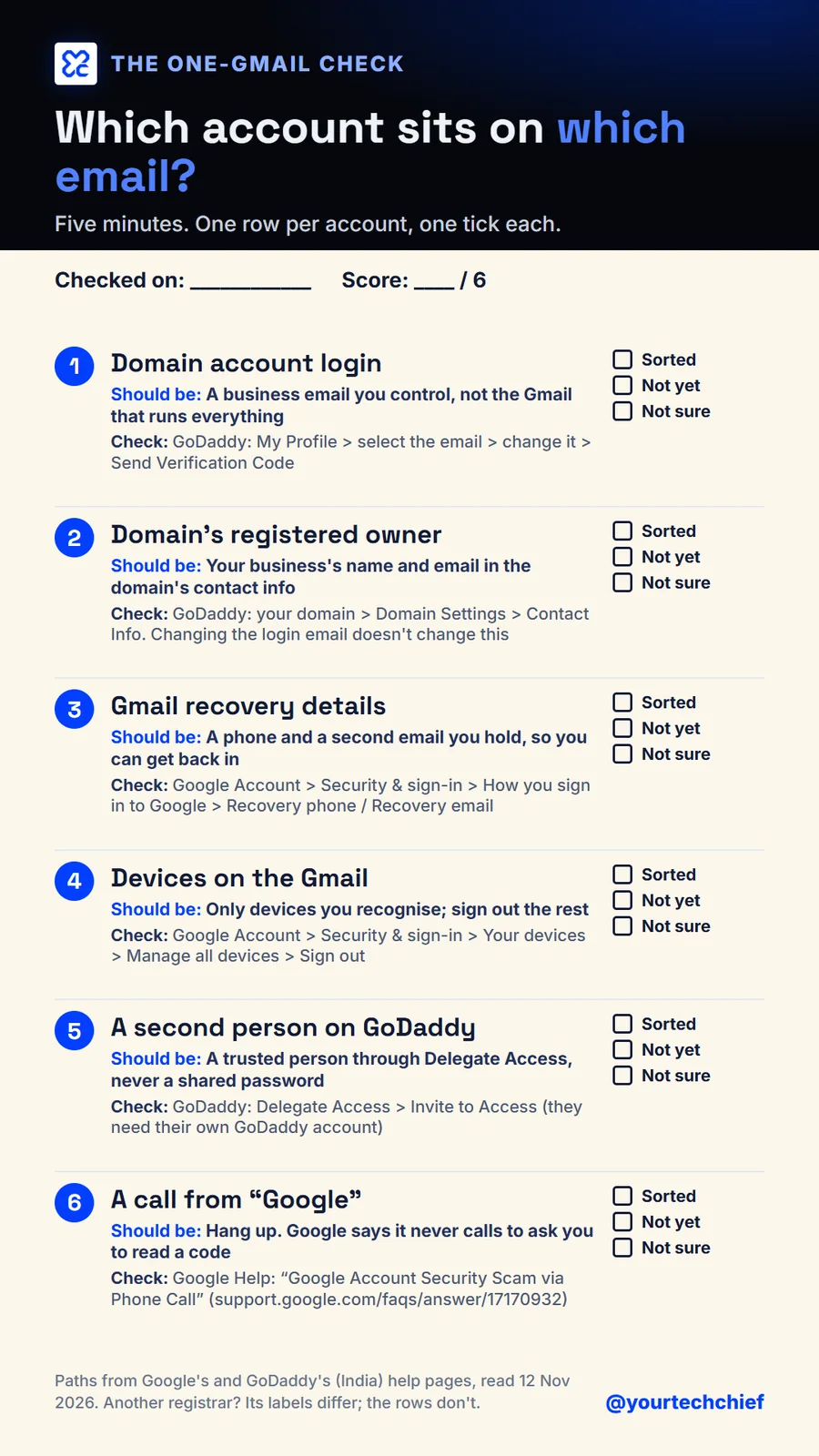
- Domain account login on a business email you control, not the Gmail that runs everything.
- The domain’s registered owner is your business’s name and email. Changing the login email doesn’t change this.
- Gmail recovery details: a phone and a second email you hold, so you can get back in.
- Devices on the Gmail: only ones you recognise. Sign out the rest.
- A second person on the registrar account through delegated access, never a shared password.
- A call from “Google” asking for a code: hang up.
Anything still on the Gmail that runs everything is worth moving to a business email. Download the One-Gmail Check as a PDF to print or share with whoever handles your accounts.
If your web developer has disappeared: what to do, in order
Start with the domain, through the registrar, with proof that the business is yours. List what you can still reach, protect it, then ask each platform for a change of owner, keeping documents in the business name ready. Move everything you recover into the company’s name. In order:
- List what you can still reach. For each of the seven accounts, note whether you can log in, and whose name and email the account is in. Write “unknown” where you can’t tell.
- Protect what you have. Change passwords on anything you can reach, turn on two-step verification, and add a second person from your own business.
- Start with the domain. ICANN answers this exact question, “my developer set up my account and is not returning my calls”: contact the registrar that registered the domain to change the registrant. Expect to prove the business is yours with documents in the business name, such as a GST certificate, invoices or utility bills, and keep them ready before you call.
- If the registrant refuses, take legal advice. For a .uk domain, Nominet’s Dispute Resolution Service handles complaints from anyone with rights in the name, such as a trade mark.
- Then the store and the rest. Ask for each transfer in writing, with a date. If the person is unreachable, each platform’s support team can tell you what proof it needs. Keep invoices that show you paid for the work.
- Move everything you recover into the company’s name, and give the next agency its own access from day one.
Recovery can take weeks; checking the seven accounts today takes an afternoon.
What should your agency contract say about ownership?
Before you pay an agency’s final invoice, or before you start with a new one, agree this in writing:
All accounts, domains, code and data created for [Company] are registered in [Company]’s name and owned by [Company]. The agency works through its own user access, which [Company] can remove at any time, and hands over every login and document within a week of the work ending.
I apply the same rule to enquiries as to accounts: give each one a named owner. For one premium real-estate business, giving every enquiry an owner and a next step took conversions from 0.6 to 1.55 a month.
A good agency will agree without hesitation. If one resists, ask why before you pay the final invoice. The same rule applies to any technology partner, including a fractional CTO: when you hire one, ask who will own the accounts they create or change. The only good answer is “you do”.
Questions owners ask about who owns their website
Which business accounts should be in my company’s name?
Seven: the domain, the business email, the Facebook and Instagram business portfolio, the WhatsApp number, the Google Business Profile, the GST registration in India, and the website hosting or online store. On each, your business should hold the top role, with two of your own people able to get in, and agencies working through their own lower access.
Do I own my domain if I paid for it?
Not necessarily. The registrar deals with the registrant of record, not whoever paid. If your developer or agency registered the domain with their own details, they are the registrant, and changes to the domain go through them. Check the contact details in your registrar account and make sure your company is the registrant.
Can my agency keep my Shopify store?
A Shopify store can have only one owner, and the owner has complete access to the admin. If your agency set the store up, it belongs to the agency until it transfers ownership to you. Ask for the ownership transfer, ideally before the final payment, and give the agency its own lower access afterwards.
What should I do if my web developer disappeared?
First list what you can still reach and whose name each account is in. For the domain, ICANN’s advice is to contact the registrar that registered it to change the registrant; expect to prove the business is yours with documents such as a GST certificate, invoices or utility bills in the business name. Then move every account you recover into the company’s name.
Who should be the admin of our business email?
Two of your own people. Google recommends more than one super administrator, each managed by a separate person, so one lost login doesn’t lock the business out. Your IT vendor can have a lower admin role. A personal Gmail has no admin console at all, so move to a business mailbox first.
Is my domain safe if two-step verification is on?
Not if someone can get the code from you. Two-step verification stops a stolen password, not a person who reads the code out to a caller. Google says it will never call you to ask for a verification code, so hang up on anyone who does, and keep the domain account on a business email rather than the Gmail that runs everything.